Work orders: get the office, the field, and the crew on the same page.

Work order software for water utilities, made for the office and the crew
A customer calls the office about a shutoff. The clerk writes it on a sticky note, radios the crew, and hopes something comes back by the end of the day. That loop is where small-utility work goes to get lost.
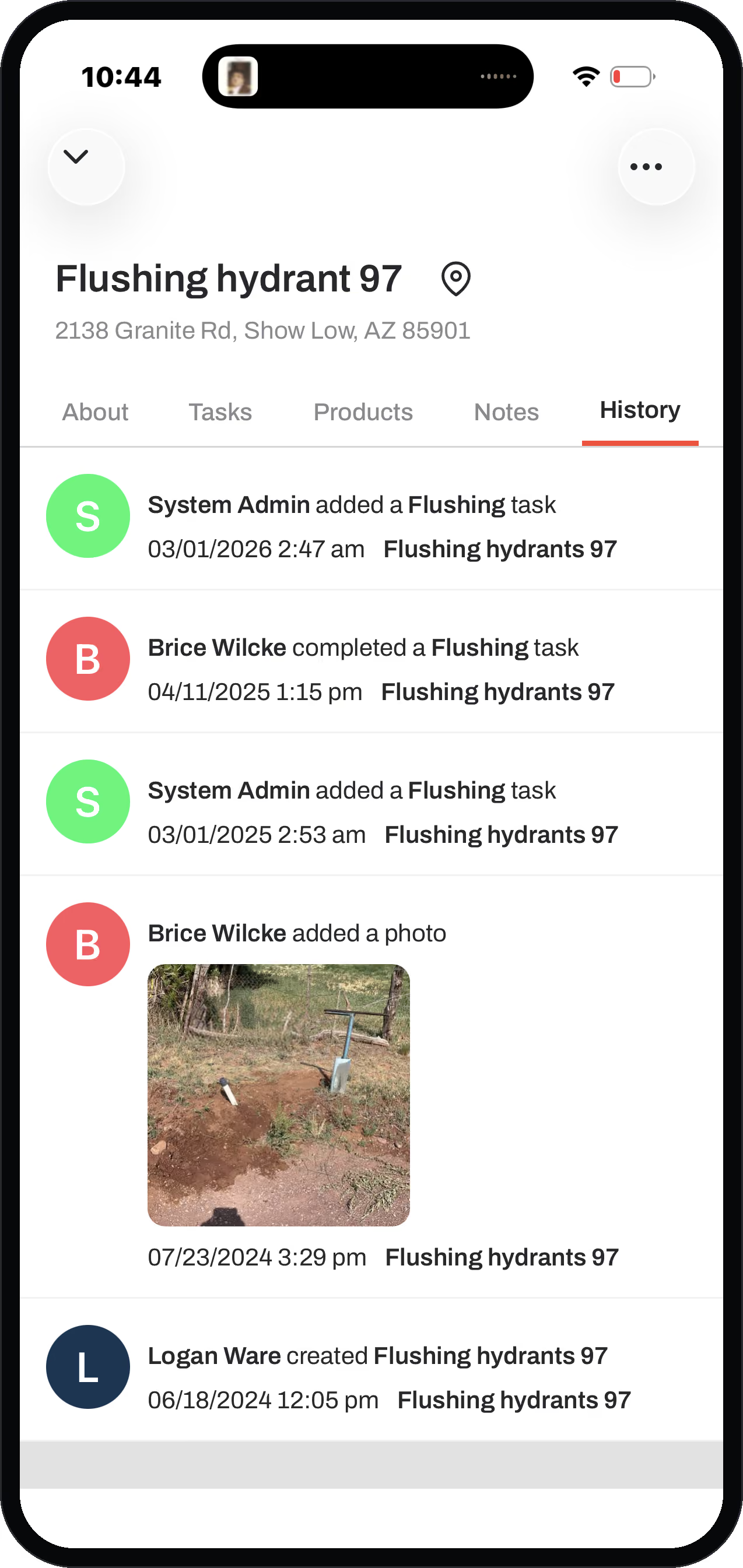
Ziptility closes the loop. The clerk creates the order at her desk and it lands on the crew's phone, attached to the meter it belongs to. The tech does the job standing in front of that meter and closes it there, gloves on, in a few taps. The moment he does, the office sees it: done, by whom, standing where, with the photo. The clerk, the field super, and the manager are looking at the same record of the same day.
- A sticky note, radioed to the crew
- You hope something comes back by the end of the day
- The loop where small-utility work goes to get lost
- The clerk creates the order at her desk
- It lands on the crew's phone, attached to the meter it belongs to
- Closed in the field, and the office sees it: done, by whom, with the photo
How do I know what the crew actually finished today?
You look, and it is there. Every closed job is stamped with who did it, when, and where they were standing.
The day's board shows what went out, what came back, and what is still open. Nobody drives back to the shop to report. Nobody keys in the day from memory on Friday.
The call every office knows: a customer asks if their water is back on. The person who answers the phone can see the reconnect closed eleven minutes ago, and says yes. No radio call. No "let me check and call you back."
Mogollon Water Management runs multiple small systems on Ziptility and gets about 15 hours a week back this way. And it holds up at scale: LaFourche, a Louisiana utility with about 36,000 connections, used to spend two days a week on disconnects with two 2-man crews. Running the same list through Ziptility, one 2-man crew finishes it in a day. That is about a day and a half every week handed back to the crew for the work that never used to get reached.
No signal at the far end of the district? The job still logs on the phone and syncs when the truck gets bars back.
Is this easier than paper and the radio?
We have to be easier than paper and the radio, not harder.
If it doesn't beat the way you already do it, it isn't worth your crew's time. That's the bar we built to.
We have all been on the apps where you hit forty-eight different buttons just to log a chlorine residual. That little bit of extra resistance is what makes a crew quietly give up on an app. They go back to paper and the expensive system sits unused. Ziptility was built for the thumb: pick the asset, pick the task, fill the fields that matter, done. If your crew would rather grab a clipboard, you have a shelf-ware problem, not a software problem. So we built to the clipboard test.
How does work order software for a water utility actually work?
The work gets assigned to the asset, not to a floating list.
That is the thing to understand about how Ziptility works, and it is the opposite of every other work order tool a small system looks at.
A generic work order system keeps a list of tickets off to the side, and the map (if there is one) is bolted on later. Here the map is the work system, and the history sticks to the thing it happened to, because it was done on the thing it happened to.
This is also why pricing is by service connection, not by the seat. The people who do the work are the ones who keep the record honest, so every operator and field tech gets full access instead of one license on the office computer. And every change is logged: who made it, where they were standing, and what it was before. If somebody fat-fingers a delete, you recover it and you can see who did it. That accountability is what makes giving the whole crew access safe.
Assigned to the asset
The work sticks to the thing it happened to, not a floating list.
The map is the work system
Not a ticket list with the map bolted on later.
Priced by connection
By service connection, not per seat, so every operator gets full access.
Nobody drives back to the shop to report.
What kinds of work can it handle?
All of it, in one app. Small-utility work does not come in one shape.
The system is built around the real shapes of it, not a single generic "create a work order" button.
In practice that is seven kinds of work, and they do not behave the same way:
Customer service orders.
The clerk creates it, a tech runs it, the office closes it. Turn-ons, shutoffs, meter reads, reconnects.
Complaints and investigations.
A high-bill check or a pressure complaint where the outcome is unknown going in, and it might spawn a repair.
Emergencies.
A main break or a lift station alarm where everyone drops what they are doing, with the follow-up work (pavement, restoration) spinning off after.
Scheduled preventive maintenance.
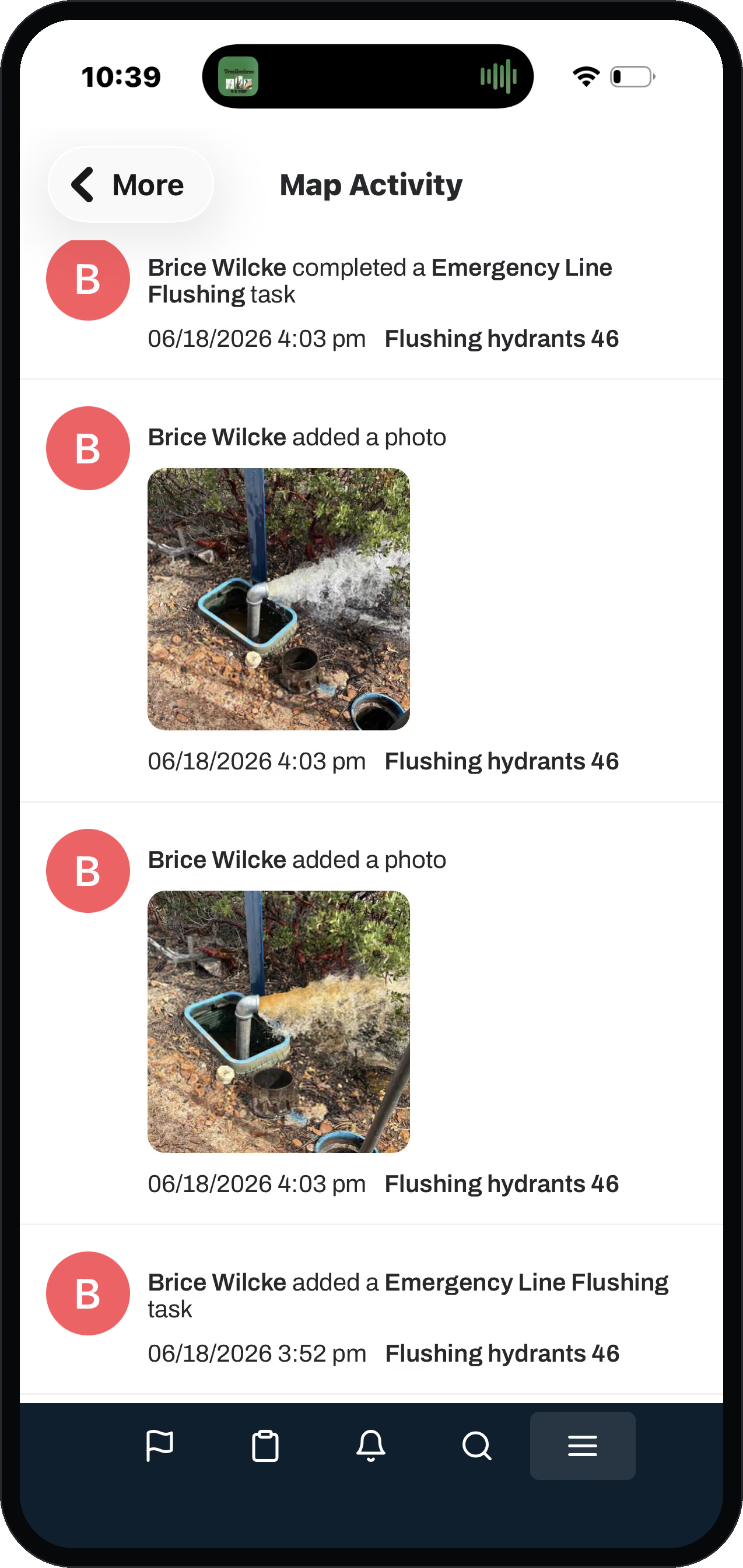
Valve exercising, hydrant flushing, manhole inspection, run by the supervisor in batches on a cycle.
Compliance and regulatory testing.
Backflow tests, bacteriological samples, meter tests. They run on a calendar, and the paperwork has to be right.
Planned repairs.
Found during an inspection, scoped, material ordered, then scheduled when ready.
Incident follow-up.
The restoration and claims work that trails an emergency, tracked separately.
A generic system treats all seven as the same ticket. Ours was built by people who ran the crew, so an emergency main break and a scheduled valve exercise behave like the different jobs they are. That is the part a software company that never ran a utility cannot fake.
What does one logged job actually capture?
A lot more than "done."
One action in the field cascades into cost, staff time, and condition behind the scenes, off a form your operator was going to fill out anyway.
Take a main break. The operator logs the repair on the main: the cause, the fix, the fittings used, a photo of the trench. Behind that one form: the parts draw down from inventory, the labor logs against his hourly rate, and the truck logs as equipment time. The main's condition updates on the map. When the task closes, parts plus equipment plus labor roll up into the true cost of that repair. Do that across every asset and you finally know what each pipe, pump, and valve actually costs you to keep alive. (Inventory and the full cost roll-up are on the Plus tier; rates are operator-set.)
Cost
Parts, equipment, and labor roll up into the true cost of the repair.
Staff time
The labor logs against his hourly rate, off the same form.
Condition
The asset's condition updates on the map, where the work happened.
Is a work order system overkill, or should I just use a spreadsheet?
A spreadsheet works until it does not, because nobody updates it standing in front of a meter. The enterprise asset-management systems can technically do everything we do and more. The catch is fit. One of those systems runs around fifty thousand dollars a year, maybe a hundred thousand to implement, and needs a full-time person to feed it. The workflow is so arduous that crews abandon it back to pen, paper, and Excel. You are paying for a city's system to run one water utility.
Ziptility sits in the middle on purpose: built for the small system run by a handful of people, and simple enough that you run it yourself with the crew you already have. It works out of the box, and you can customize it from there. If you are switching off an enterprise tool nobody adopted, that is the gap we were built for. (See the Cityworks and Lucity comparisons.)
- A spreadsheet, until nobody updates it at the meter
- An enterprise system that needs a full-time person to feed it
- Paying for a city's system to run one water utility
- Built for a small system run by a handful of people
- Simple enough to run yourself with the crew you have
- Works out of the box
Questions operators ask
What is the best work order software for a small or rural water system?
The one your crew will actually use from the field, because if they will not use it, that is the end of it. For a small system that means a map-first app where the work lands on the asset in a few taps, with no per-seat fee, simple enough to run yourself, not a scaled-down enterprise system.
Can one app handle inspections, work orders, and compliance together?
Yes. Inspections and compliance tests are task types that ride on the asset like any other work, with documentation and lab results attached and recurring tests that show up on the right board before they are due. You run compliance and wastewater inspections in the same place as your daily repairs instead of stitching three tools together.
Is a CMMS overkill for a small utility?
A spreadsheet is too little and an enterprise CMMS is usually too much, costing tens of thousands a year and needing a full-time person to feed it, which is why crews abandon them back to paper. Ziptility is built for the size of system in between.
Will my crew actually use it?
Yes, because logging a job is a few taps standing in front of the asset, not the dozens of buttons that make crews give up on other tools. The whole crew gets access (pricing is by connection, not seat), and every change is logged and recoverable.
What is collaboration or joint-use software for utilities?
It is for when more than one party touches the same assets, like a contract operator running several systems or an outside partner doing work in your system. In Ziptility an outside partner can create tasks in your organization, so joint work lands on your record instead of in a separate inbox.
Keep reading
More on getting the work tracked
Three pieces that go further than a product page can, written for the crew that is still running the day off sticky notes and phone calls.
10 work order software features for small water utilities
What actually matters when the crew is two people and one of them is on call.
Read what to look forWork orders that work with no signal
Half the system is somewhere with no bars. The work still has to get recorded.
Read about working offlineThe retiring operator problem
When the job lives in one person's head, nobody else can pick it up.
Read how to keep what they knowWork orders that close the loop between the office and the crew
The clerk creates the job, the crew closes it from the field, and both sides see the same record the same day.